
🌎 Serving All 50 States – Customized to Your Region
Our Virtual Home Evaluation service isn’t just for Washington homeowners. We proudly offer remote evaluations across all 50 U.S. states—with every report tailored to the specific codes, safety standards, and maintenance requirements for your location.
Whether you live in a Florida condo, a Texas ranch, a New York brownstone, or an Arizona mobile home, your photos are evaluated by professionals who understand your state’s unique housing environment.
Every image you submit is reviewed by:
- A licensed home inspector familiar with your region’s common home issues
- Our exclusive A.I. Home Inspector Assistant, equipped with up-to-date building codes, safety regulations, appliance recall lists, and maintenance standards from coast to coast
This means your report will reflect exactly what matters in your area—from local electrical codes to weather-related risk factors like ice dams, wildfires, humidity damage, or high wind zones.
We don’t offer cookie-cutter assessments.
We offer location-aware, fully customized virtual evaluations—no matter where in the U.S. you call home.
🏠 Why Choose a Virtual Home Evaluation?
Your home is your greatest asset—but issues can hide in plain sight. Whether you’re concerned about aging systems, buying a fixer-upper, or just want peace of mind, our Virtual Home Evaluation gives you answers—fast.
We’ve reimagined what a modern home assessment can be. No need to schedule around someone else’s calendar. No need to open your door.
With just your phone and a few minutes of your time, you can access a complete, professional-grade home review—powered by real inspectors and cutting-edge A.I. that sees what others overlook.
❓ What Makes This Different?
Unlike basic checklist apps or DIY guides, our evaluations are done by a licensed Washington State Home Inspector supported by a Custom A.I. Home Evaluator. It’s not automated fluff—it’s real expertise, delivered remotely.
We don’t just identify issues. We explain what they mean, what to do about them, and what can wait. You get actionable insight you can trust—without the stress, the jargon, or the guesswork.
💡 Ideal For:
- Busy homeowners wanting a checkup without taking time off work
- People living in rural or hard-to-reach areas
- New homeowners who want a second opinion
- Anyone who suspects hidden issues but doesn’t know where to start
- Rental property owners needing quick, remote assessments
🧰 What We Help You Uncover:
- Appliances with hidden recalls
- Signs of moisture or mold before they spread
- Safety issues you may not see
- Code violations from past work or upgrades
- Simple maintenance tasks that prevent costly damage
🛠 Your Report Isn’t Just a List—It’s a Roadmap
Many inspection reports leave you with more questions than answers. Ours gives you:
✔ Clear, easy-to-understand summaries
✔ Direct links to resources, tools, or local pros
✔ Recommendations you can actually act on—even if you’re not “handy”
✨ Experience Peace of Mind from the Comfort of Home
Whether you live in a modern condo, a historic farmhouse, or a double-wide mobile, your home deserves a fresh set of eyes. Let us give you the information you need to feel confident and in control—without anyone stepping inside.
🔒 Safe. Private. Contact-Free.
All your uploads and reports are securely handled and never shared. You stay in control of your space—and your schedule.
📋View EXAMPLE Virtual Home Evaluation Report
EXAMPLE REPORT BELOW:
📋 Purchase Virtual Home Evaluation Services – 🌟Only $10.00
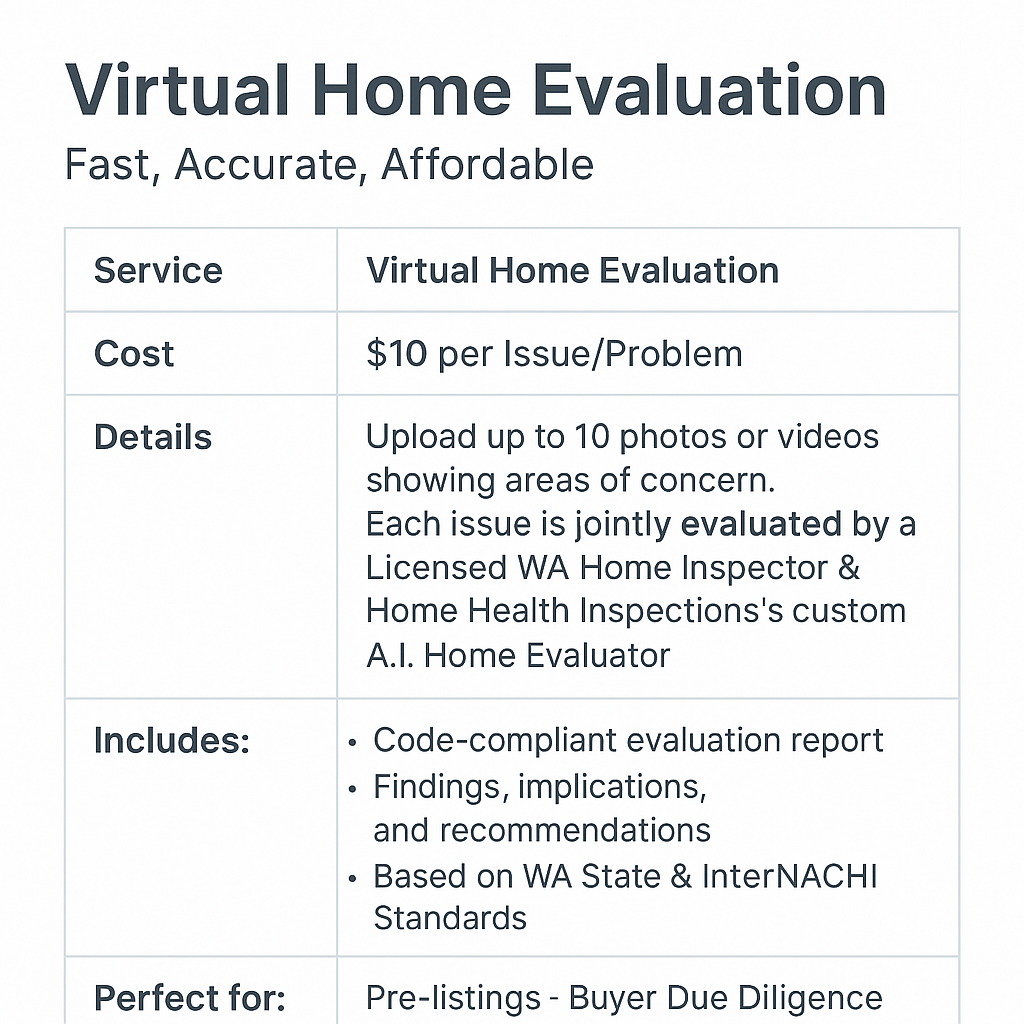
📋Virtual Home Evaluation Services start at just $10 per issue.
🏠 Virtual Home Evaluation
Our Virtual Home Evaluation Service delivers fast, professional insight into your property concerns — no on-site visit required.
📸 Upload up to 10 photos or videos highlighting specific areas or problems. Each issue will be jointly evaluated by a Licensed Washington State Home Inspector and Home Health Inspections’ Custom A.I. Home Evaluator, combining professional expertise with advanced technology for exceptional accuracy and clarity.
Clients receive a multi-page digital report detailing the findings, implications, and recommended next steps — written in clear, easy-to-understand language.
📋 When applicable, your report may also include:
- A curated list of qualified professionals who service your specific area, each vetted for quality workmanship and verified customer reviews.
- If the issue involves a simple or homeowner-safe repair, you’ll receive helpful links, guides, or handyman recommendations to complete the project confidently and correctly.
All evaluations and recommendations adhere to Washington State and InterNACHI Standards of Practice, ensuring accuracy, compliance, and trust.
❓ 50 Aspects of a home to consider having evaluated during a Virtual Home Evaluation:
📸 The Power of a Simple Photo
Don’t underestimate what today’s smartphones can reveal. Modern phone cameras capture extraordinary detail—often enough for our team to identify subtle defects, early warning signs, and maintenance concerns that might otherwise go unnoticed.
When you upload your photos, they’re first processed through our custom-built A.I. inspection interface, trained to recognize everything from code violations and aging materials to potential safety issues and moisture patterns.
Then, every image is personally reviewed by a licensed home inspector, whose trained eye brings years of field experience to each evaluation. This combination of advanced A.I. analysis and professional human expertise ensures you receive precise, reliable, and actionable insight—all from simple images taken right on your phone. We encourage clients to submit wide shots + close-ups when possible (e.g., one overview of the attic, then a zoomed-in shot of mold or moisture they spotted).
These are real-world scenarios where a single photo can reveal hidden problems or confirm things are up to standard:
📋 50 Smart Photo & Video Suggestions for Your Virtual Home Evaluation
- Water Heater – Stand far enough back to capture the entire unit, all connected water lines, electrical or gas connections, and the vent pipe (if gas). Include a close-up of the model/serial label.
- Furnace or Heat Pump – Take a full shot showing the unit, its duct connections, drain lines, and nearby wiring. Include a close-up of the manufacturer label and thermostat.
- Electrical Service Panel (Breaker Box) – Photograph the entire panel with the cover open (if safe to do so), and include a clear close-up of the label/sticker listing breaker circuits and room connections.
- Exterior Electrical Meter & Main Disconnect – Step back to show where it’s mounted on the home and any conduit or grounding wires.
- Kitchen Sink Plumbing – Open the cabinet and photograph all visible pipes, shut-off valves, and the garbage disposal (if present).
- Bathroom Sink Plumbing – Take a similar photo under the vanity to check for leaks or corrosion.
- Toilet Base & Connection Area – Capture the base where it meets the floor and the water supply connection to look for leaks or instability.
- Bathtub or Shower Walls – Stand far enough back to show tile condition, caulking, and grout. Focus on corners and lower edges where water collects.
- Dishwasher Connection Area – Photograph the drain hose under the sink and the side where it connects to the dishwasher.
- Clothes Washer Hookups – Capture the hoses, valves, and drain area behind the washer.
- Dryer Vent Outlet (Interior & Exterior) – Show how the vent connects to the dryer and where it exits the house. Look for lint buildup or kinks.
- Refrigerator Water Line – Show the small tubing or braided line supplying water to the fridge.
- Stove or Range Area – Step back to show the full appliance and confirm a wall anchor/anti-tip bracket is installed (bottom corner).
- Microwave Above Stove – Photograph vents and mounting to verify proper clearance and ventilation.
- Range Hood or Exhaust Fan – Show underside filters and vent connections.
- Bathroom Exhaust Fan Grille – Stand below and take a photo upward. If possible, take a short video with a piece of tissue or paper showing suction strength.
- Exterior Foundation Wall – Capture any visible cracks, bulges, or vegetation contact. Take close-ups of specific cracks for scale.
- Driveway or Walkway Cracks – Photograph from a few feet away to show overall length and pattern, then close-up to show width and depth.
- Exterior Siding or Stucco Damage – Take clear photos of any buckling, bulging, or water-stained areas.
- Window Frames & Sills (Exterior) – Include full window views plus close-ups of peeling paint, gaps, or failed caulking.
- Window Frames & Sills (Interior) – Photograph signs of condensation, staining, or swelling.
- Doors That Stick or Rub – Take a short video showing where the door catches or doesn’t close properly.
- Roof Edge or Eave Area (From Ground) – Step back to show gutters, fascia boards, and visible roof edges.
- Gutters & Downspouts – Show any sagging or areas where water pools. Include downspout discharge areas near the foundation.
- Chimney Exterior – Capture full height (if visible) plus close-ups of mortar joints or metal flashing.
- Attic Access Hatch – Show the opening and surrounding insulation. A flashlight can help illuminate details.
- Attic Interior (If Accessible) – Photograph rafters, insulation coverage, and any dark or stained areas on the roof sheathing.
- Crawl Space Entry – Take a photo of the entry door or hatch, including vents and ground clearance.
- Crawl Space Interior (If Accessible) – Show vapor barrier coverage, wood supports, and any visible plumbing or insulation.
- Deck or Porch Surface – Step back for a full view and then take close-ups of boards, posts, and railing attachments.
- Handrails & Guardrails – Take a photo or short clip showing how solidly they’re attached.
- Basement Walls & Floor – Capture signs of moisture, efflorescence, or cracks.
- Ceiling Stains or Discoloration – Show entire affected area and include one close-up to identify texture and color difference.
- Wall Cracks Around Windows/Doors – Take clear photos showing crack direction and length.
- Baseboards Pulling Away from Walls – Photograph gaps or separations clearly.
- Flooring Damage (Wood, Vinyl, or Tile) – Capture warped boards, loose tiles, or soft areas.
- Carpet Stains or Discoloration – Include photos where water damage might be suspected.
- Garage Interior Walls & Floor – Show cracks, stains, or moisture at the slab edges.
- Garage Door (Inside & Outside) – Photograph hinges, springs, sensors, and bottom seal; take a short video of opening/closing if possible.
- GFCI Outlets in Bathrooms, Kitchens, and Exterior – Show each outlet with the “test/reset” buttons visible.
- Exterior Hose Bibbs (Spigots) – Capture connection points, wall seals, and drips.
- Outdoor Lighting or Electrical Boxes – Photograph fixtures or covers that appear loose or corroded.
- Smoke & CO Detectors – Show installation location on walls or ceilings. Include one close-up of the test button.
- Thermostat Display – Photograph screen and surrounding wall to check placement and operation.
- Ceiling Fan or Light Fixture – Step back to show mounting and blade condition.
- Water Damage Under Windows or Near Trim – Take both a wide shot and a close-up of any soft or bubbled paint.
- Interior Electrical Outlets or Switches with Damage – Show discoloration, scorch marks, or missing covers.
- Exterior Steps or Walkways – Capture unevenness, cracks, or potential trip hazards.
- Exterior Vegetation Contacting Roof or Siding – Step back enough to show how close trees or shrubs are to the structure.
- Any Recent Repairs or Contractor Work – Take clear before-and-after photos or short videos showing workmanship for evaluation.
❓Things to consider when taking photos or videos for Virtual Evaluation Services:
📸 How to Take Great Photos for Your Virtual Home Evaluation
Good photos help us give you accurate, detailed feedback. Here’s what to keep in mind:
- Lighting: Use natural light if possible. Turn on nearby lights, and only use flash if the area is dark or shadowed (like under sinks, crawlspaces, or attics).
- Focus: Tap on the exact area you want to show (like a crack, valve, or outlet) before taking the picture—this tells your phone where to focus for sharp clarity.
- Framing: Step back enough to include the entire item or area (for example, get the full water heater with pipes and wires visible). You can take a second close-up afterward for detail.
- Orientation: Use widescreen (horizontal) mode when possible—it captures more of the scene and helps us see context around the issue.
- Steady Shot: Hold the phone still for a second after pressing the button to avoid blur.
- Multiple Angles: Take a few photos from different sides or distances to show both detail and surroundings.
- Avoid Shadows: Don’t stand directly between the light source and what you’re photographing.
- No Need to Clean First: It’s okay if the area is dusty or messy—we’re looking for condition, not appearance.
✅ Example: For a water heater
- Step back so we can see the whole unit and all attached pipes/wires.
- Take close-ups of any labels, rust spots, or leaks.
- Include the floor area beneath it if possible.
🎥 How to Take Helpful Videos for Your Virtual Home Evaluation
Videos can show things photos can’t—like movement, sound, or function. Here’s how to make them clear and useful:
- Length: Keep each clip about 10–30 seconds long—short and focused on one issue or system.
- Steady Movement: Move the camera slowly; avoid quick pans or zooms.
- Focus First: Tap the screen before recording to keep the key area sharp.
- Lighting: Turn on nearby lights and use flash only if the area is very dim.
- Narrate (Optional): You can speak while recording—point out what you’re showing or what concerns you (“this is under my kitchen sink; I think there’s a slow leak here”).
- Show Operation:
- For example, turn on the faucet, flip a switch, or show the fan running so we can see performance.
- If you hear odd noises (like a hum or buzz), try to capture them.
- Start Wide, Then Zoom In: Begin with a wide shot to show where you are, then move closer to focus on details.
🏠 Final Tip
If you’re unsure whether something is worth photographing or recording—go ahead and include it. It’s better to have extra images than miss something important.
This process helps ensure your inspector (and A.I. review) can give you the most accurate and complete evaluation possible.
📋 Virtual Home Evaluation Service Disclaimer:
🏠This Virtual Home Evaluation is not a licensed home inspection under Washington State law (WAC 308-408C). It is an image-based, informational service designed to provide general feedback on visible conditions and potential maintenance concerns in your home. No on-site evaluation is performed, and results are limited to the information provided by the client. This service is not valid for real estate transactions and should not be used as a substitute for a full in-person inspection by a licensed Washington home inspector.
📋NOTICE: This report is based solely on client-submitted images and is intended for general informational and maintenance purposes only. It is not a substitute for a full, in-person home inspection as defined under Washington State law. Hidden conditions, inaccessible areas, or misrepresented details may not be detectable via photo evaluation. We recommend a licensed home inspector be consulted for a complete, compliant inspection if you are buying, selling, or remodeling your home.
📄 Virtual Home Evaluation Terms of Use & Waiver
By using this service, you agree to the following:
- Not a Legal Inspection:
I understand that this is not a licensed Washington State home inspection and does not meet the standards set forth by WAC 308-408C or RCW 18.280. It is an image-based evaluation for general awareness only. - Image-Based Only:
I understand the findings are based solely on the quality and content of the images I provide. No physical or invasive inspection is conducted. - No Guarantee or Liability:
I acknowledge that Home Health Inspections LLC and its representatives are not liable for any conditions not visible in the photos, hidden defects, or issues arising from inaccessible areas. - Not for Transactions:
I agree not to use this report for real estate negotiations, legal disputes, or permitting purposes. It is for personal/homeowner use only. - Indemnification:
I release and hold harmless Home Health Inspections LLC, its inspector(s), and affiliated services (including its A.I. systems) from any liability related to missed conditions, personal decisions, or damages resulting from this evaluation. - Timeframe & Deliverables:
I understand that I will receive a digital report within 48 business hours of submitting all requested images, and that this report is for informational purposes only.
 Home Health Inspections